
Requirements:
- Super Admin access to Platform
Instructions
- Search for the relevant Accounts
- Under Transfers & Fees, tick 'Reverse Fees'

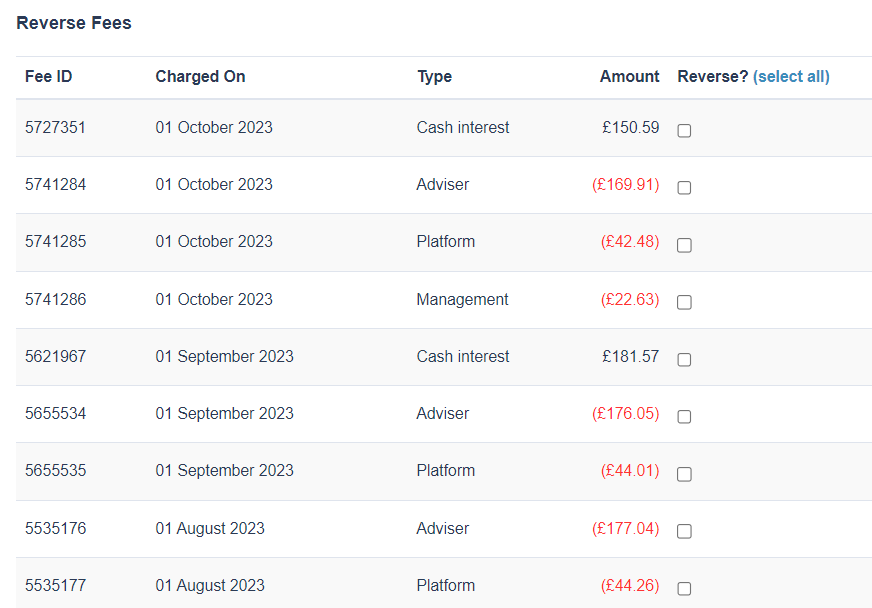
3. On the Reverse Fees page, you will see the list of reverse fees, tick the fees that needs reversing then tick 'Reverse fees' button from the bottom of the page.
In cases where the requester advise to close the account
1. You can go to 'Change platform settings' under Account management.

2. In the account status, select 'Closed' from the dropdown then 'Save changes'

Additional note:
Outstanding fees will always take priority over new trade placement. You can reverse the fees and then re-add them manually later if you need to place the purchases.
If the fees have been paid out then reversing the fees will create a pending credit on the account, which will need to be paid out before the trades can be instructed. If the fees have not been instructed then the original fees will just be removed; otherwise if it has a payment instruction created against it then a reversal transaction will be added instead.
Reference: Titan Support | RE: Priority Two Bulk Trades #1572
Comments
0 comments
Please sign in to leave a comment.